# jakal-flow
> Traceable multi-repository automation for Codex-style workflows.
[](https://www.python.org/)
[](#desktop-ui)
[](https://github.com/Ahnd6474/Jakal-flow/stargazers)
`jakal-flow` is a production-oriented CLI and desktop shell for teams doing AI-assisted work across multiple repositories.
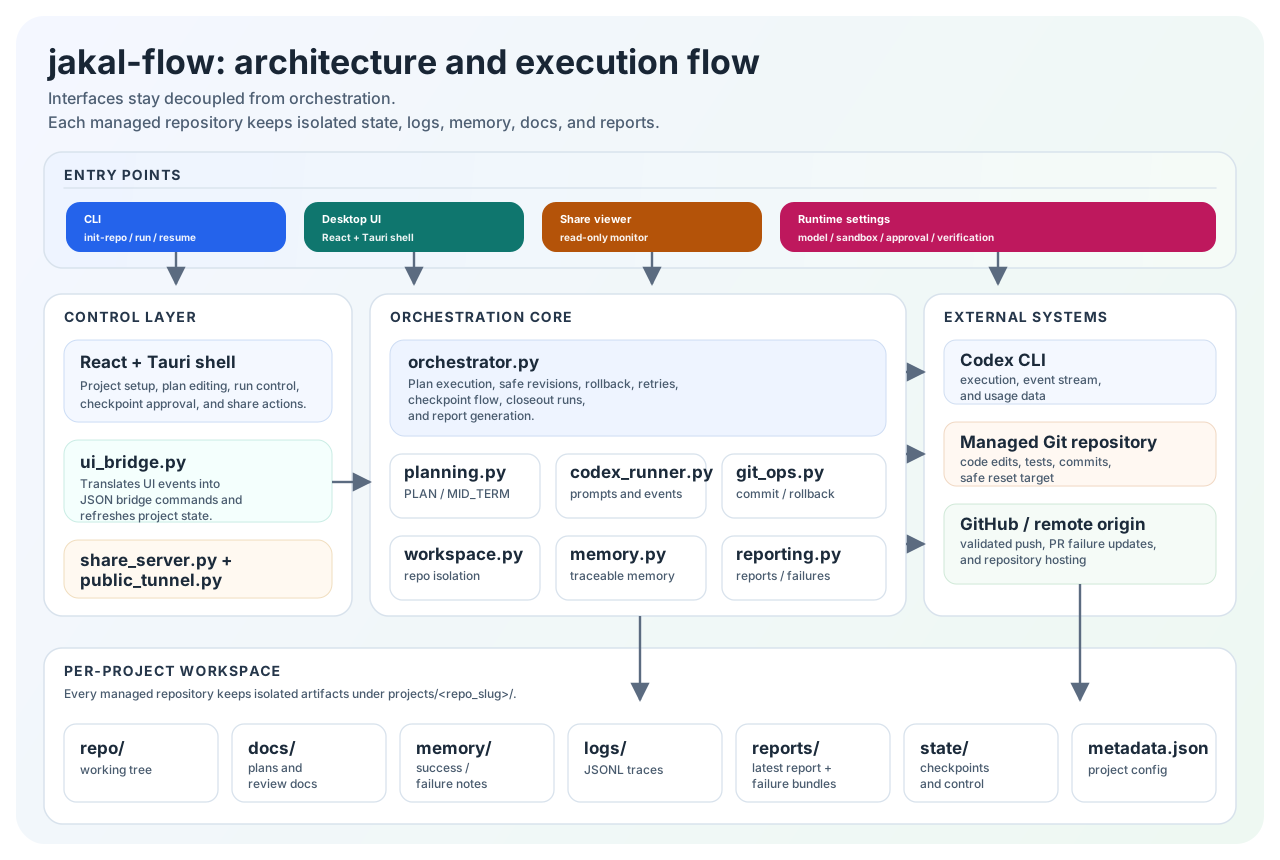
It keeps every managed repository isolated and preserves the artifacts you need to trust the run later: plans, logs, reports, memory, checkpoints, and rollback state.
- Korean guide: [README.ko.md](README.ko.md)
- Live CLI surface from this checkout: `$env:PYTHONPATH='src'; python -m jakal_flow --help`
- Current package version in this checkout: `0.1.0`
- Interactive flow shell: run `jakal-flow` with no arguments
- Recent CLI additions: `list-repos`, `history`, `logx --source-repo-dir`, `--set KEY=VALUE`, `--plan-file`
## Table of contents
- [Installation](#installation)
- [Quick start](#quick-start)
- [What jakal-flow is](#what-jakal-flow-is)
- [Why teams use it](#why-teams-use-it)
- [Command reference](#command-reference)
- [What gets stored per project](#what-gets-stored-per-project)
- [Desktop UI](#desktop-ui)
- [Release packaging](#release-packaging)
- [Product repos built with jakal-flow](#product-repos-built-with-jakal-flow)
- [Terminal-Bench 2.0](#terminal-bench-20)
- [Further reading](#further-reading)
## Installation
Install from the repository root:
```bash
python -m pip install -e .
```
Installed entrypoints:
- `jakal-flow`
- `jakal-flow-ui-bridge`
- `jakal-flow-desktop`
Requirements:
- Python 3.11+
- Codex CLI on `PATH`
- Optional for desktop: Node.js 20+, Rust, and Tauri prerequisites
## Quick start
Interactive shell:
```bash
jakal-flow
```
Interactive command grammar:
- Plain text: chat with the current project without changing the plan
- `/...`: actions such as `/plan`, `/execute`, `/debug`, `/merge`, `/closeout`
- `$...`: flow editing such as `$add`, `$set`, `$drop`, `$swap`, `$closeout`
- `!...`: runtime settings such as `!set model_provider=gemini`
- `@...`: project selection such as `@open .`, `@list`, `@use 1`
1. Create a runtime config.
```toml
[runtime]
model_provider = "openai"
model = "gpt-5.4"
effort = "high"
approval_mode = "never"
sandbox_mode = "workspace-write"
test_cmd = "python -m pytest"
max_blocks = 2
```
2. Register a repository in the managed workspace.
```bash
jakal-flow init-repo \
--repo-url https://github.com/Ahnd6474/lit.git \
--branch main \
--workspace-root .jakal-flow-workspace \
--config .jakal-flow.runtime.toml
```
3. Run work against that repository.
```bash
jakal-flow run \
--repo-url https://github.com/Ahnd6474/lit.git \
--branch main \
--workspace-root .jakal-flow-workspace \
--config .jakal-flow.runtime.toml
```
4. Inspect what happened.
```bash
jakal-flow list-repos --workspace-root .jakal-flow-workspace
jakal-flow status --repo-url https://github.com/Ahnd6474/lit.git --branch main --workspace-root .jakal-flow-workspace
jakal-flow history --repo-url https://github.com/Ahnd6474/lit.git --branch main --workspace-root .jakal-flow-workspace --limit 10
jakal-flow report --repo-url https://github.com/Ahnd6474/lit.git --branch main --workspace-root .jakal-flow-workspace
jakal-flow logx --repo-url https://github.com/Ahnd6474/lit.git --branch main --workspace-root .jakal-flow-workspace
```
Useful variations:
```bash
jakal-flow resume --repo-url https://github.com/Ahnd6474/lit.git --branch main --workspace-root .jakal-flow-workspace --config .jakal-flow.runtime.toml
jakal-flow logx --workspace-root .jakal-flow-workspace --source-repo-dir D:/GitHub/lit
jakal-flow run --repo-url https://github.com/Ahnd6474/lit.git --branch main --workspace-root .jakal-flow-workspace --config .jakal-flow.runtime.toml --set max_blocks=3
jakal-flow run --repo-url https://github.com/Ahnd6474/lit.git --branch main --workspace-root .jakal-flow-workspace --plan-file PLAN.md
```
Local `lit` repositories are also supported in local-project flows. Set `repo_backend = "lit"` in `[runtime]`, or leave it as `auto`: local setup now chooses Git when a `.git/` repository is present and falls back to lit otherwise. Remote clone/push and Git worktree flows remain Git-only for now.
## What jakal-flow is
`jakal-flow` is not a single-repository chat wrapper. It is a multi-repository operations layer that keeps each managed project under its own workspace subtree and lets the CLI and desktop shell work from the same persisted state.
If you only need one-off work in one repository, a plain agent session is simpler. If you need repeatable runs, rollback-safe execution, explainable history, and per-project artifacts across several repositories, `jakal-flow` is the better fit.
## Why teams use it
- `Per-repo isolation first`: each repository gets its own `repo/`, `docs/`, `memory/`, `logs/`, `reports/`, and `state/`.
- `Traceability by default`: execution logs, planning caches, contract-wave audit data, and reports stay attached to the project that produced them.
- `Rollback-safe orchestration`: safe revisions and recovery flow are part of the implementation, not an afterthought.
- `CLI and desktop together`: the React + Tauri app sits on top of the same Python backend instead of splitting into a separate product path.
- `Operations-friendly`: status, history, reports, and log indexing are built into the normal workflow.
## Command reference
| Command | What it does |
| --- | --- |
| `shell` | Open the interactive flow console |
| `init-repo` | Initialize and register a managed repository |
| `run` | Run one or more improvement blocks |
| `resume` | Resume a managed repository run |
| `list-repos` | List repositories managed in the workspace |
| `status` | Show repository status |
| `history` | Show block history |
| `report` | Generate a machine-readable report |
| `logx` | Collect and refresh a project log index |
Shared flags you will use often:
- `--repo-url` and `--branch` select the target repository.
- `--workspace-root` selects the managed multi-repo workspace.
- `run` and `init-repo` also accept `--config`, `--set KEY=VALUE`, and `--plan-file`.
- `logx` can work from managed state with `--repo-url` or from a local checkout with `--source-repo-dir`.
## What gets stored per project
Each managed repository gets its own isolated subtree:
```text
workspace_root/
projects/
/
repo/
docs/
memory/
logs/
reports/
state/
```
That separation is the point. `jakal-flow` keeps multi-repository history readable and auditable instead of mixing outputs from unrelated runs.
Contract-wave metadata stays inside each project's `state/` and `docs/`, including:
- `SPINE.json`
- `COMMON_REQUIREMENTS.json`
- `CONTRACT_WAVE_AUDIT.jsonl`
- `state/lineage_manifests/`
- `docs/SHARED_CONTRACTS.md`
Planning caches and telemetry are also persisted per project:
- `state/PLANNING_INPUTS_CACHE.json`
- `state/PLANNING_PROMPT_CACHE.json`
- `state/BLOCK_PLAN_CACHE.json`
- `logs/planning_metrics.jsonl`
## Desktop UI
The desktop app is a React + Tauri shell over the same Python backend.
It gives operators a visual workflow without giving up the CLI's traceability model.
Current desktop surface:
- Project setup and run control
- Plan editing and checkpoint handling
- Share actions and bridge-driven refresh
- `Contracts` sidebar for shared-contract state, CRR resolve/reopen/edit/delete flows, spine checkpoints, and recent contract-wave audit trail
Development:
```bash
cd desktop
npm install
npm run tauri:dev
```
Or from the repository root:
```bash
jakal-flow-desktop dev
```
Production build:
```bash
cd desktop
npm run tauri:build
```
Or from the repository root:
```bash
jakal-flow-desktop build
jakal-flow-desktop build-python
```
Windows one-shot release script from the repository root:
```powershell
.\build-desktop-release.ps1 -Profile python
```
## Release packaging
`jakal-flow` already has a concrete packaging path for the desktop app. The part that exists today is local build and artifact packaging. Publishing those files to GitHub Releases or another distribution channel is still a separate step.
Build the release variants from `desktop/`:
```bash
cd desktop
npm run tauri:build:full
npm run tauri:build:python
npm run tauri:build:lean
npm run tauri:build:all
```
What each variant means:
- `full`: bundles the Python runtime used by the bridge, `src/jakal_flow`, a bundled Node runtime, and any detected global npm provider CLIs found on the build machine.
- `python`: bundles the Python runtime used by the bridge, but leaves provider CLIs out. This is a sensible default when you want a usable Windows build without baking extra provider binaries into the installer.
- `lean`: packages the desktop shell plus `src/jakal_flow`, but expects Python 3.11+ and any required provider CLIs to already exist on the target machine.
Useful details:
- `jakal-flow-desktop build` maps to the default desktop build path. Use the `desktop/` npm scripts when you want a specific release profile.
- `jakal-flow-desktop build-python`, `build-full`, `build-lean`, and `build-all` expose those release profiles from the repository root.
- `build-desktop-release.ps1` is the direct Windows entrypoint for producing `.exe` and `.msi` files into `release/`.
- `desktop/scripts/build-release.mjs` copies the generated Tauri `.msi` and `.exe` bundle artifacts into the repository-level `release/` directory.
- If you want a public GitHub release page, build locally first, then upload the packaged files from `release/` as release assets.
## Product repos built with jakal-flow
`jakal-flow` is easiest to understand when you look at the kinds of repositories it can carry. These are real product repos, not a synthetic demo workspace:
- [`lit`](https://github.com/Ahnd6474/lit): a local execution VCS for autonomous coding workflows on one machine. It is a strong example of block-based planning and staged execution around checkpoints, rollback, provenance, verification, and lineage isolation.
- [`testwebsite`](https://github.com/Ahnd6474/testwebsite): a single-page React + Vite prototype built around a singularity-themed landing page and prediction console. It also shows what a clean closeout looks like, because the repo can carry its own closeout report and attempt history.
- [`calculator`](https://github.com/Ahnd6474/calculator): a precision scientific calculator with a React + TypeScript front end and a Tauri desktop wrapper. It shows `jakal-flow` working on a real packaged product repo, not just scripts and markdown.
- [`tetris`](https://github.com/Ahnd6474/tetris): a stage-based Tetris prototype with a shared headless engine and a `tkinter` UI shell. It shows that the same workflow also fits iterative Python product work where engine logic, content, tests, and UI have to move together.
## Further reading
- [desktop/README.md](desktop/README.md) for desktop build and runtime bundling details
- [website/index.html](website/index.html) for the landing page that frames product, release, and case-study positioning
## Star History
[](https://www.star-history.com/#Ahnd6474/Jakal-flow&Date)
[Live Star History chart](https://www.star-history.com/#Ahnd6474/Jakal-flow&Date)